Your Home Inspection Report Is More Than a Checklist: It Supports You!

If you have ever sat between a buyer asking "what do we request?" and a seller ready to argue every line, you already know the truth about inspections: the inspection is only half the value. The report is the half you actually use - and a good one does far more than tell you what's broken.
Most reports are treated like a checklist: a stack of problems to wade through, then re-type into an email and hope the other side takes seriously. A Tech Inspect Home Services report is built to do the opposite. It hands you the facts, the context to understand them, and a built-in way to turn them into a clean, negotiation-ready request, without retyping a thing.
This guide is for Missouri agents in St. Charles, Franklin, Warren, and Lincoln counties. Whether you represent buyers or sellers, here's how the report supports you through the part of the deal where time is tightest.
A home inspection report is more than a checklist when it adds context and action to the findings. A Tech Inspect report color-codes every finding by severity, tags it by type (safety, DIY, maintenance, and more), documents it with photos and video, and includes a built-in Repair Request Builder that turns selected findings into a clean repair or credit request — straight from the report, with no retyping.
What makes an inspection report "more than a checklist"?
A checklist tells you what is wrong. A report that supports you tells you what's wrong, what it means, and what to do next; in that order. Every Tech Inspect finding follows the same plain-English structure: the observation (what we saw), the implication (why it matters), and the recommendation (what to do about it). That structure is what turns a list of defects into something a buyer can act on and an agent can negotiate from.
A few features do the heavy lifting here, and they're worth understanding before you walk into a repair conversation. You can see all of them inside what's in a Tech Inspect report:
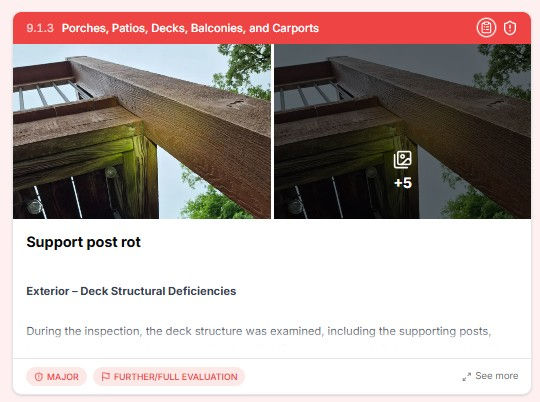
Color-coded severity ratings. Every finding is rated — Major, Moderate, Minor, Maintenance, Monitor, or Informational - so at a glance you know what's a safety issue, what's a real defect, and what's cosmetic.
Context tags. Beyond severity, each finding carries tags like Safety Hazard, Further Evaluation, Installation Defect, Aged, Inquire with Seller(s), DIY, and Maintenance Item. Severity tells you how urgent; tags tell you what kind of issue it is and who should handle it.
Summary views and filters. Filter the web report by severity or category to show just the safety items, just the roof, or the full picture. You can take a nervous buyer straight to the three things that matter, then to what they can shrug off.
Photos and video. High-resolution photos and video document each finding in place — visual proof, not vague descriptions. DIY items even come with a short how-to clip and a link to the right part.
A Tech Inspect home inspection report includes a photo- and video-documented review of the home's major systems — roof, structure, foundation, electrical, plumbing, HVAC, exterior, and interior, with color-coded severity ratings, context tags, summary filters, plain-English narratives, a recommended contractor list, and a built-in Repair Request Builder. Reports are mobile-friendly, shareable by link, and delivered within 24 hours.
That last point matters more than agents expect. The better the report underneath, the stronger every downstream request, because you're working from specific defect language, organized findings, and photos from a licensed professional, not a buyer's memory of a walkthrough.
What is the Repair Request Builder?
The Repair Request Builder is a tool built directly into every Tech Inspect inspection report that lets an agent or buyer turn documented findings into a formatted, itemized repair or credit request, without copy-and-paste, third-party software, or starting from scratch. The defect descriptions, photos, and severity ratings are already in the report; you select what to request, add notes or credit amounts, and export a finished document ready to send or print.
Think of it as taking the inspector's findings and converting them into a polished negotiation exhibit in about ten minutes. It's one of three ways to read the same report, alongside the Full Report (every system, every narrative) and the Summary (issues only, ranked by severity). And it isn't an add-on or a separate app: it's included automatically with every home inspection report, available the moment the report is published.
"The Repair Request Builder turns a detailed inspection report into a polished negotiation exhibit, without any manual reformatting."
Why does this matter for Missouri real estate negotiations?
Missouri transactions move fast. Once the inspection period opens, you're typically working inside a 10–15 day window, and you still need time to negotiate after the report lands. Time is of the essence - so the quality of your repair request directly affects whether negotiations resolve cleanly or stall.
Vague or disorganized requests invite pushback. A clear, documented, photo-backed list of specific defects, sorted by priority and presented professionally, is much harder to dismiss. Here's the difference in practice:
Without the Repair Request Builder | With the Repair Request Builder |
Re-read the full report manually | Select findings directly with checkboxes — one click to add an item |
Re-type each defect in a separate document | Descriptions and photos are pulled in automatically |
Re-describe defects in your own words | The licensed inspector's original language carries over |
Attach photos separately, or skip them | Photos are already attached to each item |
Send an informal email or typed list | Send a polished PDF or shareable link instantly |
Start over to add or remove items | Edit and regenerate new versions as the deal moves |
When the other side receives a professionally formatted document with photos and specific defect language drawn from a licensed inspector's report, it signals that the request is grounded, organized, and defensible. It removes ambiguity, and ambiguity is what fuels back-and-forth.
How do you access the Repair Request Builder?
Once a Tech Inspect report is published, the Repair Request Builder is available immediately — no account to create, nothing to install. Open the report link and select Repair Request Builder from the options in the upper-right corner. That's it.

Agent portal access: Agents receive client-portal access when the inspector includes the portal link in the agent confirmation email sent at scheduling, standard practice at Tech Inspect. Clients can also share the link directly. Not sure if you have access? Reach out, and we'll confirm or resend it.
How do you build a repair request, step by step?
The whole process happens inside the report. Here's the workflow.
1. Create a new repair request. You can create multiple requests per report, so you can keep a running log of versions as negotiations evolve.

2. Name the document. Click the pencil to edit the name in the upper-left. Use something clear, the property address and inspection date work well for transaction files.
3. Select your items from the Summary view. Click the clipboard icon next to any finding to add it to the request. They're added automatically, no copy-and-paste.

4. Add notes and dollar amounts. Back in the request, add comments, enter a credit or estimated cost on each item, and add text to appear at the top of the PDF. Any credit amounts are summed for you automatically.

5. Sort the items. Drag the cards by the dots on the left to reorder, put the most important items on top, or group related issues to support your strategy.

6. Generate the PDF or share directly. When everything's in, generate the PDF or share the request by link, text, or email.

7. (Optional) Let AI draft the language. The built-in, AI-assisted feature turns your selected findings into clear, contract-style verbiage, grouped by system, framed as a repair or a seller credit (your call), with your dollar amounts folded into a running total.

A note on the AI draft: It's a starting point, not legal advice. Review and edit the wording, and confirm it with your broker, before it goes into a contract. Used that way, it can save you an evening of staring at a blank addendum.
Reminder: Every inspection photo and the inspector's narrative carry over into the Repair Request Builder automatically, alongside your notes and requested amounts.
How do you pair it with the Missouri Realtors Inspection Notice Form?
This is where the builder becomes especially powerful for Missouri agents. The Missouri Realtors Inspection Notice Form is the standard document for formally documenting buyer inspection objections and responses. Most agents fill it out with a general description of concerns, which works, but leaves room for interpretation and back-and-forth.
A stronger approach: use the Repair Request Builder to generate a detailed, item-by-item exhibit, then attach that PDF to the Inspection Notice Form as Exhibit A.
This does three things at once. It makes the notice significantly more specific and harder to dismiss. It gives the listing agent a professional document they can take straight to their client without translating vague language. And it ties each request to documented inspector findings, with photos and descriptions from a licensed professional, not the buyer's interpretation of a walkthrough.
"Attaching the Repair Request Builder PDF to the Missouri Inspection Notice Form turns a standard form into a fully documented negotiation exhibit."
The full workflow, inspection to amendment:
Step | Action | Notes |
1 | Inspection completed | Report published and delivered by automated notification, within 24 hours |
2 | Open the Repair Request Builder | Access it from the report |
3 | Select findings and add details | Choose items, add credit amounts and repair/replacement preferences |
4 | Export as PDF | Generate, then print or save |
5 | Attach to the Inspection Notice Form | Include the PDF as Exhibit A to your formal notice |
6 | Edit and resend as needed | Update items and create new versions for a clean audit trail |
This adds maybe fifteen minutes to your workflow, and can save hours of back-and-forth by making the buyer's position clear, specific, and professionally documented from the first submission.
How do you revise the request during negotiation?
Negotiations rarely resolve in one round. As counteroffers come in and items are accepted, rejected, or modified, you'll likely revise at least once. The builder makes that simple: duplicate the original request, adjust it based on where the negotiation is heading, and regenerate. Because you can keep multiple versions per report, you end up with a clean record of how the ask evolved.

See exactly what your clients receive
The fastest way to understand how the report supports a negotiation is to open one. We've published three full sample reports you can click through just like a client would — a modern home in O'Fallon, a 100-year-old home in St. Louis County, and a new-construction pre-drywall inspection in St. Charles County. You'll see the color-coded ratings, the filters, the context tags, and the photos and video in a real report, start to finish.
It takes about two minutes, and it's the clearest picture of what your buyers walk away with, and what you'll be building repair requests from.
Why partner with Tech Inspect Home Services
A tool like the Repair Request Builder is only as good as the report underneath it. A thorough, well-documented inspection gives you more to work with: specific defect language, more photos, organized findings that translate directly into a stronger request. Our reports are built for exactly that kind of downstream use.
Here's what we offer agents specifically:
Follow-up support: we'll help prioritize defects and build out the repair-request plan.
St. Charles County Association of Realtors affiliate member: part of your professional community, not just a vendor.
Supra key access and ShowingTime coordination: we handle scheduling logistics so you don't have to.
Real-time status updates: you'll know what's happening during the inspection without calling for one.
Same-day delivery: automated notifications send the moment the report is published, guaranteed within 24 hours.
Same-week scheduling and weekend availability: because inspection windows in competitive markets don't wait for business hours.
Schedule follow-up consultations: agents can book time with the inspector directly on the inspector's calendar.
One agent portal: every report you've ordered from us in one place, ready to open, filter, and re-share.
Frequently asked questions
Is the Repair Request Builder an extra cost? No. It's included automatically with every Tech Inspect home inspection report and is available the moment the report is published — no account or install required.
Do I need the buyer to build the request, or can I do it as the agent? Either. Agents with portal access can build the request directly, and clients can share the report link with their agent. Both sides of the transaction can use it.
Does the request include the inspector's photos and language? Yes. The inspector's narrative, photos, severity ratings, and your notes and requested amounts all carry over into the request automatically.
Can I create more than one version of a request? Yes. You can build multiple requests per report and duplicate and edit them as the negotiation moves — which gives you a clean version history.
How fast will my client get the report? The digital report is guaranteed within 24 hours of the inspection — fast enough to review and negotiate inside a typical 10–15 day window.
What counties does Tech Inspect serve? St. Charles, Franklin, Warren, and Lincoln counties and the surrounding East-Central Missouri communities.
Ready to give your next client a report that supports the negotiation?
Same-week availability, weekend appointments, Supra key access, and a report delivered within 24 hours. See three full sample reports, explore everything inside the report, or schedule your next inspection , and we'll make the process seamless for you and your clients.
Tech Inspect Home Services LLC · 3580 Highway T, Marthasville, MO 63357 · 636-201-6366 · sean@techinspecthome.com